- Home Page /
- Industrial Supplies /
- Digital Signage /
- Digital Kiosks & Interactive Displays /
- Signature Pad ePaper SignPad e-Signature on Word, Excel...
0 ratings

Item #:
178656804
Signature Pad ePaper SignPad e-Signature on Word, Excel, PDF, Power Point with Timestamp 6x4 Inch Visualized Tablet with Battery-Free Stylus Pen
Item #:
178656804
€ 96
Price Details
Excluding Shipping & Custom charges ( Shipping and custom charges will be calculated on checkout )
*All items will import from US
0 ratings
Write a review
In stock
 Imported from USA store
QTY:
Order now and get it around Wednesday, July 15
Secured transaction
Ubuy works hard to protect your security and privacy. Our advanced payment security system ensures confidentiality by encrypting your information during transmission using AES (Advanced Encryption Standards) and SSL (Secure Socket Layer) protocols. Your payment details are 100% secure as we do not share your payment details with third party sellers.
Our Top Logistics Partners


Experience groundbreaking control and fluidity with the YZ04 signature tablet and its advanced battery-free stylus.

Fast
Shipping

Free
Return*

Secure Packaging

100% Original Products

PCI DSS Compliance

ISO 27001 Certified


Note: Step Down Voltage Transformer required for using electronics products of US store (110-120). Recommended power converters Buy Now.


What Stands Out
Battery-Free Stylus
Eliminates the need for charging, ensuring uninterrupted use and convenience for users, enhancing productivity without the hassle of batteries.
Cross-Platform Compatibility
Seamlessly connects to Mac, Windows, and Chromebook devices, making it versatile for various work environments, ensuring all users can enjoy its benefits.
Compact Size
The 6x4 inch design makes it portable and easy to store, perfect for professionals on the go who require a reliable tablet solution without sacrificing space.
Product Details
| Item Weight | 1 lbs (450 grams) |
Dangerous Goods
To avoid the delay in customs clearance process for Dangerous Goods, the shipment shall be opened at our warehouse facility to check the severity of hazardous components. Please see the list of Dangerous goods here.
Who Should Buy?

-
Professionals
Ideal for professionals needing to capture signatures electronically for contracts, documents, and agreements seamlessly.
-
Students
Perfect for students who want to take handwritten notes or sign digital assignments succinctly and efficiently.
-
Sales Representatives
Sales reps can use it for client signatures on sales orders or proposals while on the go, enhancing productivity.

-
Artists
Not suitable for professional artists seeking detailed and nuanced drawing capabilities that require pressure sensitivity.
-
Heavy Users
Individuals who use a tablet for long periods may find this product uncomfortable due to its size and functionality.
-
Advanced Users
Experienced digital artists or graphic designers might need more advanced features and flexibility than what this pad offers.
Product Description
Signature Pad ePaper SignPad e-Signature on Word, Excel, PDF, Power Point with Timestamp 6x4 Inch Visualized Tablet with Battery-Free Stylus Pen Tablet for Windows
Have any Query? Chat with us
Customer Questions & Answers
-
Question:
What are the main features of the Signature Pad for Work 6x4 Inch Tablet?
Answer: The Signature Pad boasts a sleek 6x4 inch design, making it compact and easy to use on various surfaces. It comes with a battery-free stylus pen, ensuring you never have to worry about replacing batteries. It is compatible with major operating systems like Mac, Windows, and Chromebook, allowing seamless integration with most devices. Its pressure-sensitivity feature provides an authentic drawing experience, making it suitable for both signing documents and creative tasks. -
Question:
Is the Signature Pad compatible with all software applications?
Answer: While the Signature Pad is compatible with a wide range of applications, compatibility may vary depending on the software used. It works best with programs that support stylus input, such as PDF readers and design software. Many users find it useful for signing documents in applications like Adobe Acrobat or creating illustrations in programs like CorelDRAW. This versatility makes it ideal for professionals in various fields, from legal to creative industries. -
Question:
Can I use the battery-free stylus on other devices?
Answer: The battery-free stylus included with the Signature Pad is primarily designed to work with the tablet itself. While it may interact with other capacitive screens, functionality may be limited and not optimized. The stylus is engineered to deliver precision on the tablet, making it perfect for signature capturing and detailed designs. For best performance, use it exclusively with the Signature Pad to maximize its capabilities, especially while working on intricate projects. -
Question:
How do I connect the Signature Pad to my computer?
Answer: Connecting the Signature Pad to your computer is simple. It typically uses a USB connection; you just plug it into an available port on your Mac, Windows, or Chromebook device. After a successful connection, your computer should automatically recognize the pad. For optimal performance and access to all features, installing the manufacturer’s drivers and software is recommended, enhancing usability and functionality. -
Question:
What is the typical use case for the Signature Pad?
Answer: The Signature Pad is perfect for capturing electronic signatures, making it an invaluable tool for businesses handling contracts and agreements. Additionally, it can be used for creative tasks like digital art or note-taking, providing artists and students with a platform to sketch and jot down ideas. Its compact size also allows for easy transport, so whether you’re in the office or on the go, it’s a versatile accessory that adapts to your needs. -
Question:
Does the Signature Pad require special drivers to work?
Answer: Yes, the Signature Pad may require specific drivers or software for full functionality, which are typically available on the manufacturer's website. These drivers not only enable basic connectivity but also unlock additional features such as pressure sensitivity settings and customizable shortcuts. Installing the correct drivers enhances the overall user experience, making it smoother when working on various applications, whether signing documents or creating digital artwork. -
Question:
How sensitive is the pressure on the Signature Pad?
Answer: The Signature Pad features high-pressure sensitivity, allowing users to create varying line thicknesses based on how hard they press the stylus against the surface. This characteristic is essential for artists and designers looking to achieve precise, natural strokes and shading in their work. Users often appreciate this feature for its accuracy in delivering a realistic drawing experience, whether for professional illustrations or personal sketches. -
Question:
Can the Signature Pad be used for educational purposes?
Answer: Absolutely! The Signature Pad is an excellent tool for students and educators alike. It can facilitate digital note-taking, allowing students to handwrite their notes, which has been shown to improve retention. Additionally, teachers can use it to create engaging presentations or provide feedback directly on student work. Its compatibility with various devices enhances its utility in classrooms, offering an innovative way to blend traditional learning with digital solutions. -
Question:
What types of stylus features should I expect?
Answer: The stylus included with the Signature Pad offers several notable features. It is battery-free, which means it requires no charging, ensuring it's always ready for use. It also has an ergonomic design, making it comfortable to hold during extended use. Moreover, its pressure sensitivity allows users to achieve different line weights by varying their grip, offering creative flexibility for those working on detailed tasks. This combination of convenience and precision makes the stylus a key part of the Signature Pad experience. -
Question:
Where can I buy the Signature Pad for Work 6x4 Inch Tablet?
Answer: You can buy the Signature Pad for Work 6x4 Inch Tablet with Battery-Free Stylus Pen on Ubuy in Malta. Ubuy offers a user-friendly shopping experience with a variety of products, making it a reliable platform for acquiring your tablet. By purchasing from Ubuy, you can find detailed product information and reviews that help you make an informed decision.
Havapen Digital Kiosks & Interactive Displays Editorial Review
No editorial reviews found
Customer Reviews & Ratings
1 customers ratings
-
5 Star
100%
-
4 Star
0%
-
3 Star
0%
-
2 Star
0%
-
1 Star
0%
Review this product
Share your thoughts with other customers
Platform Trust & Buyer Confidence

MT
Mohd
Verified buyer
“The product received very good packaging & safe…Thank You”
16 June 2026 · via Trustpilot
SJ
Shawati
Verified buyer
“Accurate delivery timing given”
16 June 2026 · via Trustpilot
YB
Youcef
Verified buyer
“Not madly expensive like I thought, and much quicker than promised.”
15 June 2026 · via Trustpilot
LM
Leila
Verified buyer
“Never dealt with Ubuy before, but everything worked out great. Seamless cross border purchasing and shipping. Thanks!”
6/7/2026 · via Trustpilot
KA
Kwame
Verified buyer
“The process was smooth, with clear communication and timelines. This was my 1st purchase and I am really impressed. I will definitely be coming back.”
12 June 2026 · via Trustpilot
Secure Checkout
Global Delivery
Easy Returns
Genuine Products
Product Price History
Important information
- Limitations : For products shipped internationally, please note that any manufacturer warranty may not be valid; manufacturer service options may not be available; product manuals, instructions, and safety warnings may not be in destination country languages; the products (and accompanying materials) may not be designed in accordance with destination country standards, specifications, and labeling requirements; and the products may not conform to destination country voltage and other electrical standards (requiring use of an adapter or converter if appropriate). The recipient is responsible for assuring that the product can be lawfully imported to the destination country. When ordering from Ubuy or its affiliates, the recipient is the importer of record and must comply with all laws and regulations of the destination country.
- Not all the products listed on Ubuy are for sale, as Ubuy is a global search engine. Products are subject to export/trade regulations.
€ 96
Order now and get it around Wednesday, July 15
This item is not restrict in my country.(Please click on above link if this item is not restrict in your country, So our team will review and allow.)
QTY:
Secured transaction
PCI DSS compliant and ISO 27001:2022 certified, with encrypted payments and full buyer protection on every order.
Our Top Logistics Partners
Fastest cross-border delivery
Features & Benefits
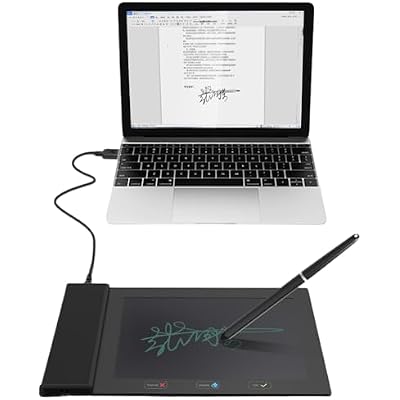
- Shows signature on both tablet display and computer screen.
- Battery-free stylus for constant use without interruptions.
- Ideal for digital E-signatures, online teaching, and remote work.
- Compatible with Microsoft Office apps like Word and PowerPoint.
- Ultra-thin tablet with a 6 x 4 inch active area.
- Provides 8192 levels of pen pressure sensitivity for precise control.
Ubuy Assurance
Experience worry-free shopping with 100% original products, PCI DSS-compliant payment security, ISO 27001-certified data protection, the fastest cross-border delivery, free returns *, and secure packaging on every order.