0 ratings

Item #:
94396475
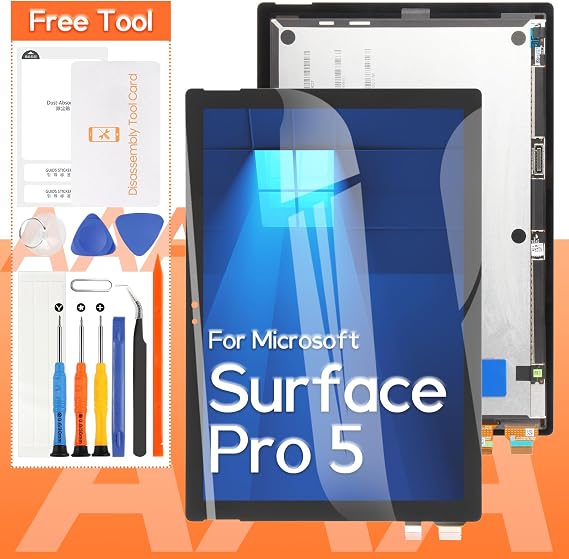
Screen Replacement for Microsoft Surface Pro 5 1796 LP123WQ1 LCD Display Touch Screen Digitizer Full Assembly(Black)
Item #:
94396475
€ 117
Price Details
Excluding Shipping & Custom charges ( Shipping and custom charges will be calculated on checkout )
*All items will import from US
0 ratings
Write a review
In stock
 Imported from USA store
QTY:
Order now and get it around Monday, August 24
Secured transaction
Ubuy works hard to protect your security and privacy. Our advanced payment security system ensures confidentiality by encrypting your information during transmission using AES (Advanced Encryption Standards) and SSL (Secure Socket Layer) protocols. Your payment details are 100% secure as we do not share your payment details with third party sellers.
Our Top Logistics Partners


We offer a complete replacement kit for the Microsoft Surface Pro 5, ensuring a straightforward installation while providing essential tools for a hassle-free experience.

Fast
Shipping

Free
Return*

Secure Packaging

100% Original Products

PCI DSS Compliance

ISO 27001 Certified


Note: Step Down Voltage Transformer required for using electronics products of US store (110-120). Recommended power converters Buy Now.


What Stands Out
Easy Installation
Designed for straightforward installation, this screen replacement kit allows users to swiftly replace their damaged display without professional help, saving both time and repair costs.
High-Quality Display
Featuring an LP123WQ1 LCD, this display ensures vibrant colors and sharp visuals, greatly enhancing the user experience for professionals and casual users alike.
Complete Assembly
The full assembly includes everything needed for a seamless replacement, eliminating the hassle of searching for additional parts, making it convenient for users wanting a comprehensive solution.
Product Details
| Package Dimensions | 13.27 x 10.91 x 1.85 inches (33.7 x 27.7 x 4.7 cm) |
| Item Weight | 1.26 pounds (570 grams) |
| Manufacturer | THIRDPOLE |
| Item model number | 1796,LP123WQ1 |
| Date First Available | August 1, 2024 |
Who Should Buy?

-
Repair Enthusiasts
Ideal for DIYers looking to fix their broken Surface Pro 5 screen at an affordable price.
-
Device Owners
Perfect for users whose devices have cracked screens and need a reliable replacement solution.
-
Technical Professionals
Suitable for technicians who specialize in electronic repairs and require quality replacement components.

-
Non-Tech Users
Not suitable for individuals who lack technical skills for installation or repair of electronic devices.
Product Description
Screen Replacement for Microsoft Surface Pro 5 1796 LP123WQ1 LCD Display Touch Screen Digitizer Full Assembly(Black)
Have any Query? Chat with us
Customer Questions & Answers
-
Question:
What should I consider before replacing my Microsoft Surface Pro 5 screen?
Answer: Before proceeding with a screen replacement for your Microsoft Surface Pro 5, consider your technical skills and tools required. Replacement might involve delicate procedures such as disassembling the device and managing fragile components. It’s crucial to have a clean workspace and the correct tools, including a heat gun, suction cup, and prying tools. If you have experience with DIY electronics repair, you may successfully undertake this task, but if not, professional assistance may be preferable. -
Question:
Can I install the Screen Replacement myself?
Answer: Yes, you can install the screen replacement for your Surface Pro 5 yourself, provided you're comfortable with DIY repairs. Tutorials and guides online provide step-by-step instructions. However, ensure that you have the right tools and a careful approach, as damaging components during installation is a risk. This replacement can extend the device's lifespan and restore its functionality, making your Surface Pro usable for everyday tasks once again. -
Question:
How can I ensure the new LCD display is compatible with my Surface Pro 5?
Answer: To ensure compatibility, verify that the screen replacement is specifically designed for the Microsoft Surface Pro 5, model number 1796. Check product descriptions and specifications from suppliers to confirm that they match your device. This screen replacement features an LP123WQ1 LCD display and touch screen digitizer assembly, making it suitable for precise fit and performance. Double-checking the details helps prevent issues that could arise from mismatched components, ensuring smooth operation. -
Question:
What tools do I need for replacing my Surface Pro 5 screen?
Answer: For a successful screen replacement, you will need a few essential tools: a precision screwdriver set, a heat gun or hairdryer (to soften the adhesive), a suction cup, and plastic prying tools. These tools enable you to carefully open your device without causing damage. If you are equipped with these tools and follow a detailed guide, you can complete the replacement process effectively and safely, restoring your tablet’s functionality. -
Question:
What features should I look for in a replacement screen?
Answer: When choosing a replacement screen for your Microsoft Surface Pro 5, consider features such as display resolution, color accuracy, and touch response. A high-quality full assembly replacement typically offers 2736 x 1824 resolution and an IPS panel for vibrant colors. Make sure the screen is a complete assembly, meaning it includes the LCD display, digitizer, and necessary encapsulations for ease of installation. These factors enhance your viewing experience and ensure the device performs as intended. -
Question:
Is there a way to test the new screen before fully reinstalling it?
Answer: Yes, before fully reinstalling the new screen into your Surface Pro 5, it is advisable to connect it temporarily to the motherboard to perform basic functionality tests. This way, you can check for display quality, touch responsiveness, and overall function. Ensure all connections are secure yet easy to remove so you can address any issues promptly. Testing beforehand can save time and frustration, ensuring your device operates correctly once the installation is complete. -
Question:
What common issues can arise during the installation of a new screen?
Answer: Common issues during installation include improper adhesive removal, damaged connectors, or misalignment of the screen. These problems can lead to display malfunction or the screen not adhering correctly. To reduce risks, ensure you follow a detailed guide, handle components carefully, and double-check alignments before sealing the device. If encountered, troubleshooting these common pitfalls early in the process can lead to a smoother installation experience, ensuring your Surface Pro 5 operates as intended. -
Question:
How do I properly dispose of my old screen?
Answer: Proper disposal of your old Surface Pro 5 screen is important for environmental protection. Check local electronic waste regulations to find out how to recycle electronic components responsibly. Many communities have designated drop-off locations for e-waste. Disposing of it in an environmentally friendly manner helps minimize waste and ensures that harmful materials in electronic devices are managed correctly. -
Question:
Where can I buy Screen Replacement for Microsoft Surface Pro 5 1796 LP123WQ1 LCD Display Touch Screen Digitizer Full Assembly(Black) in Malta?
Answer: You can buy the Screen Replacement for Microsoft Surface Pro 5 1796 LP123WQ1 LCD Display Touch Screen Digitizer Full Assembly (Black) at Ubuy. They offer a reliable platform with a wide selection of replacement parts, ensuring you receive a quality product that meets your device’s specifications. Check their website for availability and detailed product information to assist you in making the right purchase.
THIRDPOLE Replacement Screens 1796,LP123WQ1 Editorial Review
No editorial reviews found
Customer Reviews & Ratings
1 customers ratings
-
5 Star
100%
-
4 Star
0%
-
3 Star
0%
-
2 Star
0%
-
1 Star
0%
Review this product
Share your thoughts with other customers
Platform Trust & Buyer Confidence

MA
Mohammad
Verified buyer
“Excellent quality and original too,when ubuy send original things I will appreciate that ,I very satisfied thank you”
23 July 2026 · via Trustpilot
CK
Chitra
Verified buyer
“The order and delivery progress was communicated very well. Package arrived within the estimated time. Products arrived as expected in good condition.”
22-Jul-26 · via Trustpilot
K
kund
Verified buyer
“Good supply of products. Safe payment methods, and shipment worldwide! Genuine products.”
23-Jul-26 · via Trustpilot
OO
Onesi
Verified buyer
“Was my first time buying a product from Ubuy, but I found it so helpful. This is reliable. Gonna place a new order!”
22 July 2026 · via Trustpilot
SJ
SAO JOHN
Verified buyer
“Ubuy is a great online platform to buy stuff. Reliable, fast delivery time and great value for money. I've been using Ubuy online shopping platform for three years now and will continue to do so.”
23 July 2026 · via Trustpilot
Secure Checkout
Global Delivery
Easy Returns
Genuine Products
Product Price History
Important information
- Limitations : For products shipped internationally, please note that any manufacturer warranty may not be valid; manufacturer service options may not be available; product manuals, instructions, and safety warnings may not be in destination country languages; the products (and accompanying materials) may not be designed in accordance with destination country standards, specifications, and labeling requirements; and the products may not conform to destination country voltage and other electrical standards (requiring use of an adapter or converter if appropriate). The recipient is responsible for assuring that the product can be lawfully imported to the destination country. When ordering from Ubuy or its affiliates, the recipient is the importer of record and must comply with all laws and regulations of the destination country.
- Not all the products listed on Ubuy are for sale, as Ubuy is a global search engine. Products are subject to export/trade regulations.
€ 117
Order now and get it around Monday, August 24
This item is not restrict in my country.(Please click on above link if this item is not restrict in your country, So our team will review and allow.)
QTY:
Secured transaction
PCI DSS compliant and ISO 27001:2022 certified, with encrypted payments and full buyer protection on every order.
Our Top Logistics Partners
Fastest cross-border delivery
Features & Benefits
- Complete replacement kit for Microsoft Surface Pro 5.
- Includes essential tools for easy installation.
- No paper instructions—video guides available on YouTube.
- Professional installation experience recommended.
- Thorough quality testing before shipment.
- Satisfactory solutions for any faulty products.
Ubuy Assurance
Experience worry-free shopping with 100% original products, PCI DSS-compliant payment security, ISO 27001-certified data protection, the fastest cross-border delivery, free returns *, and secure packaging on every order.