0 ratings

Item #:
124435575
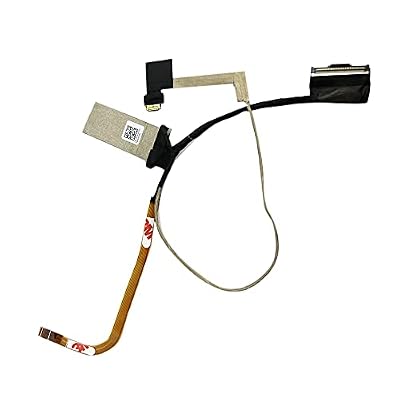
JINTAI Suyitai LCD LVDS LED Screen Video Display Flex Cable Replacement for Dell XPS 15 9575 M5530 2 in 1 Precision 5530 2in1 DAZ10 LCD EDP Cable FHD
Item #:
124435575
€ 22
Price Details
Excluding Shipping & Custom charges ( Shipping and custom charges will be calculated on checkout )
*All items will import from US
0 ratings
Write a review
In stock
 Imported from USA store
QTY:
Order now and get it around Wednesday, July 22
Secured transaction
Ubuy works hard to protect your security and privacy. Our advanced payment security system ensures confidentiality by encrypting your information during transmission using AES (Advanced Encryption Standards) and SSL (Secure Socket Layer) protocols. Your payment details are 100% secure as we do not share your payment details with third party sellers.
Our Top Logistics Partners


Easy for you to replace your faulty, cracked or broken one.

Fast
Shipping

Free
Return*

Secure Packaging

100% Original Products

PCI DSS Compliance

ISO 27001 Certified


Note: Step Down Voltage Transformer required for using electronics products of US store (110-120). Recommended power converters Buy Now.


What Stands Out
High Compatibility
Specifically designed to fit Dell XPS 15 9575 and Precision 5530 models, ensuring a perfect fit for seamless performance and reliability.
Enhanced Durability
Constructed with high-quality materials for improved longevity, this cable resists wear and tear, providing a longer-lasting solution compared to standard cables.
Easy Installation
User-friendly design allows for quick and hassle-free installation, making it an ideal choice for both professionals and DIY enthusiasts seeking efficient repairs.
Product Details
| Item Weight | 0.1 lbs (50 grams) |
Who Should Buy?

-
DIY Laptop Repair
Ideal for tech-savvy individuals looking to replace damaged cables in Dell XPS 15 or Precision 5530 models.
-
Cost-Conscious Users
A cost-effective solution for users wanting to repair instead of replacing their entire laptop for minor issues.
-
Replacement Needs
Perfect for users whose laptops experience display issues due to malfunctioning LVDS cables and need replacements.

-
Non-Technical Users
Not suitable for those unfamiliar with laptop repairs who may struggle to install this flex cable correctly.
-
Older Laptop Models
Designed specifically for newer models, making it inappropriate for older laptops not compatible with this cable.
-
Professional Repairs
Less ideal for professional repair shops seeking high-quality parts, as this may not meet rigorous standards.
Product Description
JINTAI Suyitai LCD LVDS LED Screen Video Display Flex Cable Replacement for Dell XPS 15 9575 M5530 2 in 1 Precision 5530 2in1 DAZ10 LCD EDP Cable FHD 30PIN CN:DC02C00GF00 0TV555 TV555
Have any Query? Chat with us
Customer Questions & Answers
-
Question:
What is the Suyitai LCD LVDS LED Screen Video Display Flex Cable for Dell XPS 15 9575?
Answer: The Suyitai LCD LVDS LED Screen Video Display Flex Cable is a replacement part specifically designed for Dell XPS 15 9575 and Precision 5530 2-in-1 models. This cable connects the laptop's motherboard to the display, facilitating the transmission of video and data signals. If your laptop’s screen is flickering, showing artifacts, or is completely dark, replacing this cable can resolve those issues. It is ideal for users who experience display problems due to cable wear or damage. -
Question:
How do I know if I need to replace the flex cable?
Answer: You may need to replace the flex cable if your screen is experiencing flickering, discoloration, or is not displaying an image at all. This can often manifest as a failure to power on, intermittent display connectivity, or issues displaying graphics. If you have already ruled out software and driver issues, inspecting your cable connections is a good next step. A visual inspection for physical damage or wear can help determine if replacement is necessary. -
Question:
Is the Suyitai cable compatible with other Dell models?
Answer: The Suyitai LCD LVDS Flex Cable is specifically engineered for Dell XPS 15 9575 and Precision 5530 2-in-1 models. While it may share similarities with other cables, compatibility is crucial for ensuring optimal performance and connection. Using an incompatible cable can lead to further display issues or even damage to your device. Always check the specifications of your laptop to ensure you have the correct cable for your model. -
Question:
What tools do I need to install the replacement cable?
Answer: To install the Suyitai LCD LVDS LED Screen Video Display Flex Cable, you'll typically need a set of precision screwdrivers, a plastic spudger for opening the laptop casing, and possibly tweezers for handling small components. It’s recommended to work in a well-lit environment to see screws and connectors clearly. Following a detailed repair guide or video tutorial for your specific model can further assist you in the installation process. -
Question:
Can I install the flex cable myself or should I seek professional help?
Answer: Installing the Suyitai flex cable can be done by yourself if you have basic technical skills and are comfortable opening your laptop. However, if you are not experienced with electronics repairs, seeking professional help is advisable to prevent any accidental damage. Professionals can ensure that the installation is done correctly and safely, minimizing the risk of further issues post-repair. -
Question:
How can I ensure the longevity of my new flex cable?
Answer: To ensure the longevity of your new Suyitai flex cable, handle the laptop with care and avoid bending the cable excessively during use. Regularly check for signs of wear, particularly around the hinge area where stress on the cable can occur. Keeping the laptop in a cool, dust-free environment can also help maintain component integrity. Moreover, if you notice any display issues, addressing them promptly can extend the life of your cable. -
Question:
What are the indicators that my laptop may have cable issues?
Answer: Indicators that your laptop may have cable issues include a blank screen, flickering, or distorted images during operation. You might also experience intermittent connection problems, where the display cuts in and out. Conducting simple tests, such as jostling the laptop's screen slightly to see if the display reacts, can confirm cable issues. If you identify such symptoms, replacing the cable is a suitable step toward restoring functionality. -
Question:
Where can I buy the Suyitai LCD flex cable in Malta?
Answer: You can purchase the Suyitai LCD LVDS LED Screen Video Display Flex Cable for your Dell XPS 15 9575 on Ubuy. They offer a wide range of electronic parts and accessories, ensuring you receive the right product for your laptop model. Ubuy provides reliable service and product availability across Malta, making it a convenient option for your purchasing needs. -
Question:
What is the installation process for the Suyitai LCD flex cable?
Answer: The installation process for the Suyitai LCD LVDS Flex Cable involves several steps. Start by carefully removing the laptop casing using a precision screwdriver and plastic spudger. Once the casing is off, locate the old flex cable, disconnect it from both ends, and replace it with the new cable. Reconnect everything securely, replace the casing, and power on your laptop to test the new display functionality. For visual guidance, consider following an instructional video specific to your laptop model. -
Question:
What should I do if my display issue persists after replacing the flex cable?
Answer: If display issues persist after replacing the Suyitai flex cable, there may be other underlying problems such as a faulty screen or motherboard components. It’s advisable to check connections, verify the new cable is installed correctly, and rule out software-related issues. If everything appears to be in order and problems continue, consulting a professional technician for a more thorough diagnosis would be beneficial.
JINTAI Internal Components Editorial Review
No editorial reviews found
Customer Reviews & Ratings
1 customers ratings
-
5 Star
100%
-
4 Star
0%
-
3 Star
0%
-
2 Star
0%
-
1 Star
0%
Review this product
Share your thoughts with other customers
Platform Trust & Buyer Confidence

MT
Mohd
Verified buyer
“The product received very good packaging & safe…Thank You”
16 June 2026 · via Trustpilot
SJ
Shawati
Verified buyer
“Accurate delivery timing given”
16 June 2026 · via Trustpilot
YB
Youcef
Verified buyer
“Not madly expensive like I thought, and much quicker than promised.”
15 June 2026 · via Trustpilot
LM
Leila
Verified buyer
“Never dealt with Ubuy before, but everything worked out great. Seamless cross border purchasing and shipping. Thanks!”
6/7/2026 · via Trustpilot
KA
Kwame
Verified buyer
“The process was smooth, with clear communication and timelines. This was my 1st purchase and I am really impressed. I will definitely be coming back.”
12 June 2026 · via Trustpilot
Secure Checkout
Global Delivery
Easy Returns
Genuine Products
Product Price History
Important information
- Limitations : For products shipped internationally, please note that any manufacturer warranty may not be valid; manufacturer service options may not be available; product manuals, instructions, and safety warnings may not be in destination country languages; the products (and accompanying materials) may not be designed in accordance with destination country standards, specifications, and labeling requirements; and the products may not conform to destination country voltage and other electrical standards (requiring use of an adapter or converter if appropriate). The recipient is responsible for assuring that the product can be lawfully imported to the destination country. When ordering from Ubuy or its affiliates, the recipient is the importer of record and must comply with all laws and regulations of the destination country.
- Not all the products listed on Ubuy are for sale, as Ubuy is a global search engine. Products are subject to export/trade regulations.
€ 22
Order now and get it around Wednesday, July 22
This item is not restrict in my country.(Please click on above link if this item is not restrict in your country, So our team will review and allow.)
QTY:
Secured transaction
PCI DSS compliant and ISO 27001:2022 certified, with encrypted payments and full buyer protection on every order.
Our Top Logistics Partners
Fastest cross-border delivery
Features & Benefits
- Compatible with Dell XPS 15 9575 and Precision 5530 2-in-1 models.
- Package includes one flex video cable for repair.
- Designed for easy installation, but requires special skills.
- Ensure you check model compatibility before purchasing.
- Ideal solution for replacing faulty, cracked, or broken cables.
- Contact customer service for any questions or assistance.
Ubuy Assurance
Experience worry-free shopping with 100% original products, PCI DSS-compliant payment security, ISO 27001-certified data protection, the fastest cross-border delivery, free returns *, and secure packaging on every order.