- Home Page /
- Electronics /
- Computer Accessories /
- Computer Accessories & Peripherals /
- Input Devices /
- Graphics Tablets /
- RubensTab T11 Pro standalone Drawing Tablet N...
0 ratings


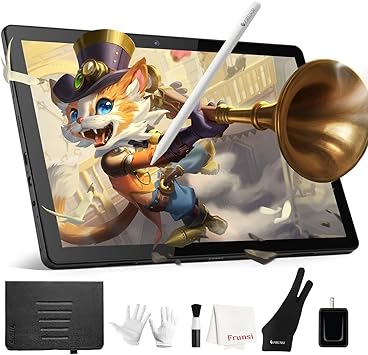


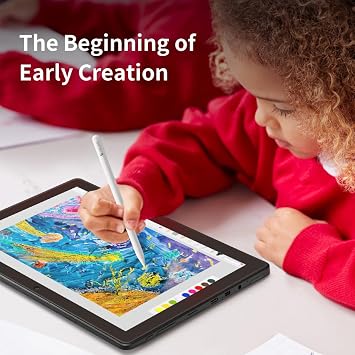


Standalone Drawing Tablet with Screen No Computer Needed offers clear and colorful display with vibrant true tone and color. Installed with Android 11, it comes with 4GB RAM and 64GB Storage, supports TF card reading up to 128GB. Works without any other computer and you can install even more drawing application from Play Store. It comes with 5800mAh battery that supports 5 hours working time and Adjustable Stand Case with 10 adjustable levels for better drawing angle.

Item #:
47484190
RubensTab T11 Pro standalone Drawing Tablet No Computer Needed,10.1 inch FHD Display,Octa-Core CPU,Pre-Installed Drawing Apps & Tutorials,More Bonus
Item #:
47484190
€ 230
Price Details
Excluding Shipping & Custom charges ( Shipping and custom charges will be calculated on checkout )
*All items will import from US
In stock
 Imported from USA store
QTY:
Order now and get it around Thursday, August 13
Secured transaction
Ubuy works hard to protect your security and privacy. Our advanced payment security system ensures confidentiality by encrypting your information during transmission using AES (Advanced Encryption Standards) and SSL (Secure Socket Layer) protocols. Your payment details are 100% secure as we do not share your payment details with third party sellers.
Our Top Logistics Partners


Standalone Drawing Tablet with Screen No Computer Needed offers clear and colorful display with vibrant true tone and color. Installed with Android 11, it comes with 4GB RAM and 64GB Storage, supports TF card reading up to 128GB. Works without any other computer and you can install even more drawing application from Play Store. It comes with 5800mAh battery that supports 5 hours working time and Adjustable Stand Case with 10 adjustable levels for better drawing angle.

Fast
Shipping

Free
Return*

Secure Packaging

100% Original Products

PCI DSS Compliance

ISO 27001 Certified


Note: Step Down Voltage Transformer required for using electronics products of US store (110-120). Recommended power converters Buy Now.


What Stands Out
Standalone Functionality
The RubensTab T11 Pro operates independently, allowing users to draw anywhere without needing a computer. Perfect for artists and students seeking convenience and flexibility in their creative process.
High-Resolution Display
Featuring a 10.1 inch FHD display, this tablet provides vibrant colors and sharp details, enhancing the drawing experience by accurately representing artwork and reducing eye strain during prolonged use.
Beginner-Friendly Tools
Includes pre-installed drawing apps and tutorials, making it an excellent choice for beginners. The additional bonus items empower users to explore art with confidence, fostering creativity and skill development.
Product Details
- 10 Inch Drawing Tablet with Screen, no computer needed
- Android 13 Pen Display with 4GB RAM, 64GB Storage, and TF card slot
- FHD IPS HD display with 1280*800P resolution and palm rejection feature
- Standalone tablet with Android 13, MTK quadcore cpu chips, and Play Store access
- 4000mAh battery with 5 hours working time, includes adjustable stand case
- Designed for artists with leading technology in pressure sensitivity and lag-free tracking
| Brand | Frunsi |
| Model Name | RubensTab |
| Built-In Media | 1 x Digital Pen, 1 x Stylus, 1 x Gloves, 1 x Cleaning Cloth |
| Target Audience | Teacher |
| Model Number | RubensTab |
| Manufacturer | Frunsi |
| Mfr Part Number | 56458465012 |
| Color | Black |
| Connectivity Technology | USB |
| Pressure Sensitivity | 1024 levels |
| Operating System | Android 12 |
| Additional Features | pen |
| Specific Uses For Product | Drawing |
| Compatible Devices | Tablet |
| Display Type | LCD |
| Native Resolution | 1920*1200 |
| Screen Size | 10.1 inches (25.7 cm) |
| Item Dimensions L x W | 7.87"L x 6.69"W (20 cm) |
| Active Surface Area | 52.57 square inches (133.5 cm) |
| Special Feature | pen |
What's in the box
1 x Digital Pen, 1 x Stylus, 1 x Gloves, 1 x Cleaning Cloth
Who Should Buy?

-
Beginners
Ideal for novice artists seeking an easy-to-use tablet with pre-installed apps and tutorials to aid learning.
-
Students
Great for students who want to practice drawing digitally without needing a computer for their coursework.
-
Casual Artists
Perfect for casual artists who enjoy sketching or doodling on-the-go without the limitations of a traditional setup.

-
Professional Artists
Less suitable for professionals requiring advanced features and extensive software options for detailed artworks.
Product Description
Have any Query? Chat with us
Customer Questions & Answers
-
Question:
What makes the RubensTab T11 Pro a standalone drawing tablet?
Answer: The RubensTab T11 Pro is designed as a standalone drawing tablet, which means it does not require a connection to a computer to operate. This feature allows artists and creators to work anywhere without the hassle of additional hardware. With its built-in capabilities, including an Octa-Core CPU and pre-installed drawing apps, users can start creating immediately, making it perfect for sketching on the go or in any environment. -
Question:
Can I customize my experience with pre-installed drawing apps?
Answer: Yes, the RubensTab T11 Pro comes with a selection of pre-installed drawing apps tailored for various types of artistic expression. Users can customize their working environment by choosing the app that best suits their needs, whether it’s for casual doodling or professional-level illustrations. Moreover, tutorials provided can enhance your skills in using these applications effectively. -
Question:
What is the quality of the display on the RubensTab T11 Pro?
Answer: The RubensTab T11 Pro features a 10.1 inch FHD display that delivers vibrant colors and sharp details. This high-quality screen is perfect for artists who need precision and clarity in their artwork. The visual experience is further enhanced with sensitive touch technology, allowing for a natural drawing experience that mimics traditional media. -
Question:
How does the Octa-Core CPU enhance performance?
Answer: The Octa-Core CPU in the RubensTab T11 Pro significantly boosts the device's performance, allowing for smooth multitasking and faster processing. This is especially advantageous when running multiple drawing applications or handling complex tasks. Artists will appreciate how quickly they can switch between apps, access tools, and execute commands, leading to a more efficient workflow. -
Question:
What types of tutorials are available on the RubensTab T11 Pro?
Answer: The RubensTab T11 Pro includes a range of tutorials designed to help users make the most out of their drawing tablet. These tutorials cover basic skills for beginners to advanced techniques for experienced artists. They serve as an excellent resource for learning about various drawing styles and utilizing the tablet’s features effectively, fostering a supportive learning environment. -
Question:
Is the RubensTab T11 Pro suitable for professional artists?
Answer: Absolutely! The RubensTab T11 Pro is well-equipped for professional artists thanks to its powerful hardware and quality display. It supports high-resolution work and complex applications, making it a reliable tool for serious graphic artists, illustrators, and designers. Its portability also makes it a great option for professionals who are often on the move. -
Question:
What accessories can enhance my experience with the RubensTab T11 Pro?
Answer: To enhance your experience with the RubensTab T11 Pro, consider using accessories like stylus pens with pressure sensitivity, portable stands for better ergonomics, and protective cases for safe transport. These additions can improve your workflow and comfort while using the tablet, allowing for greater creativity and ease of use in various environments. -
Question:
How does the drawing function feel on the RubensTab T11 Pro?
Answer: The drawing function on the RubensTab T11 Pro feels incredibly responsive due to its advanced touch technology, which captures every stroke with high precision. The tablet is engineered to provide a natural drawing experience, mimicking traditional pen and paper. This responsiveness is crucial for artists seeking to capture their creative visions accurately. -
Question:
Can I transfer my artwork to other devices?
Answer: Yes, the RubensTab T11 Pro allows users to easily transfer their artwork to other devices. It supports various file formats, enabling you to export your creations to computers or cloud storage services. This feature is particularly useful for artists who wish to share their work on social media or collaborate with others across different platforms. -
Question:
Where can I buy the RubensTab T11 Pro?
Answer: You can buy the RubensTab T11 Pro from Ubuy, which offers a comprehensive selection of electronic devices in Malta. Ubuy is known for its user-friendly interface and reliable customer service, ensuring a smooth purchasing experience. Their platform makes it easy to find and order the tablet along with other accessories that may enhance your drawing experience.
Frunsi Graphics Tablets RubensTab Editorial Review


The Standalone Drawing Tablet with Screen No Computer Needed and Android 11 Pen Display 4GB64GB is a budget-friendly option for people who are interested in exploring digital art. However, the screen resolution is low and the color space/gamut used is low which affects the accuracy of colors in drawing apps. Additionally, the CPU of the tablet is not powerful enough to handle multiple layers on any app. If you are looking for a better option, the 2019 Samsung Galaxy Tab S6 or an iPad would be a better investment. Despite its limitations, this tablet is perfect for young artists who are trying digital art for the first time. It comes with preloaded drawing apps and accessories including Android Pen Stylus, a protective case, USB type C charge cord, and screen cleaning supplies. The battery life is good, allowing up to 5 hours of continuous use. It is also easy to connect to wifi and add new apps through the Google Play store.
Customer Reviews & Ratings
694 customers ratings
-
5 Star
73%
-
4 Star
12%
-
3 Star
6%
-
2 Star
3%
-
1 Star
6%
Review this product
Share your thoughts with other customers
Pros
- Budget-friendly option for those interested in digital art
- Comes with preloaded drawing apps and accessories
- Easy to connect to wifi and add new apps
Cons
- Low screen resolution and color space/gamut
Platform Trust & Buyer Confidence

MA
Mohammad
Verified buyer
“Excellent quality and original too,when ubuy send original things I will appreciate that ,I very satisfied thank you”
23 July 2026 · via Trustpilot
CK
Chitra
Verified buyer
“The order and delivery progress was communicated very well. Package arrived within the estimated time. Products arrived as expected in good condition.”
22-Jul-26 · via Trustpilot
K
kund
Verified buyer
“Good supply of products. Safe payment methods, and shipment worldwide! Genuine products.”
23-Jul-26 · via Trustpilot
OO
Onesi
Verified buyer
“Was my first time buying a product from Ubuy, but I found it so helpful. This is reliable. Gonna place a new order!”
22 July 2026 · via Trustpilot
SJ
SAO JOHN
Verified buyer
“Ubuy is a great online platform to buy stuff. Reliable, fast delivery time and great value for money. I've been using Ubuy online shopping platform for three years now and will continue to do so.”
23 July 2026 · via Trustpilot
Secure Checkout
Global Delivery
Easy Returns
Genuine Products
Product Price History
Important information
- Limitations : For products shipped internationally, please note that any manufacturer warranty may not be valid; manufacturer service options may not be available; product manuals, instructions, and safety warnings may not be in destination country languages; the products (and accompanying materials) may not be designed in accordance with destination country standards, specifications, and labeling requirements; and the products may not conform to destination country voltage and other electrical standards (requiring use of an adapter or converter if appropriate). The recipient is responsible for assuring that the product can be lawfully imported to the destination country. When ordering from Ubuy or its affiliates, the recipient is the importer of record and must comply with all laws and regulations of the destination country.
- Not all the products listed on Ubuy are for sale, as Ubuy is a global search engine. Products are subject to export/trade regulations.
€ 230
Order now and get it around Thursday, August 13
This item is not restrict in my country.(Please click on above link if this item is not restrict in your country, So our team will review and allow.)
QTY:
Secured transaction
PCI DSS compliant and ISO 27001:2022 certified, with encrypted payments and full buyer protection on every order.
Our Top Logistics Partners
Fastest cross-border delivery
Features & Benefits
- Clear and colorful display with vibrant true tone and color
- Installed with Android 11, 4GB RAM and 64GB Storage
- Supports TF card reading up to 128GB
- Works without any other computer and you can install even more drawing application from Play Store
- 5800mAh battery that supports 5 hours working time
- Adjustable Stand Case with 10 adjustable levels for better drawing angle
Ubuy Assurance
Experience worry-free shopping with 100% original products, PCI DSS-compliant payment security, ISO 27001-certified data protection, the fastest cross-border delivery, free returns *, and secure packaging on every order.