- Home Page /
- Electronics /
- Computer Accessories /
- Computer Accessories & Peripherals /
- Input Devices /
- Graphics Tablets /
- XPPen Deco Pro Small Graphics Drawing Tablet ...
0 ratings





Item #:
46024123
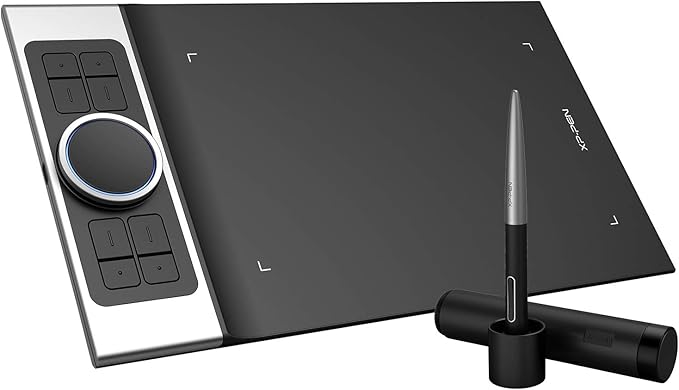
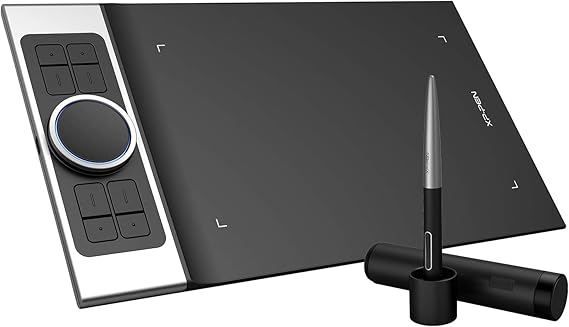
XPPen Deco Pro Small Graphics Drawing Tablet Ultrathin Digital Pen Tablet with Tilt Function Double Wheel and 8 Shortcut Keys 8192 Levels Pressure
Item #:
46024123
€ 117
Price Details
Excluding Shipping & Custom charges ( Shipping and custom charges will be calculated on checkout )
*All items will import from US
In stock
 Imported from USA store
QTY:
Only 5 items left in stock.
Order now and get it around Friday, July 10
Secured transaction
Ubuy works hard to protect your security and privacy. Our advanced payment security system ensures confidentiality by encrypting your information during transmission using AES (Advanced Encryption Standards) and SSL (Secure Socket Layer) protocols. Your payment details are 100% secure as we do not share your payment details with third party sellers.
Our Top Logistics Partners


XPPen Deco Pro, the XPPen’s latest tablet release, makes its debut as the 2019 Red Dot Design Award Winner and the 2018 Good Design Award Winner.

Fast
Shipping

Free
Return*

Secure Packaging

100% Original Products

PCI DSS Compliance

ISO 27001 Certified


Note: Step Down Voltage Transformer required for using electronics products of US store (110-120). Recommended power converters Buy Now.


What Stands Out
Bluetooth Connectivity
Experience hassle-free wireless drawing with Bluetooth capabilities, allowing you to connect seamlessly to devices without tangled wires and enhancing your creative workspace.
Customizable ExpressKeys
Personalize your workflow with 8 customizable ExpressKeys, enabling quick access to your favorite shortcuts, which boosts productivity during artwork creation and reduces time spent on repetitive tasks.
Dual Dial Wheels
Utilize two ergonomic dial wheels for effortless control of brush size, opacity, or zoom, making drawing and painting smoother and providing an intuitive user experience for artists and designers.
Product Details
- Award-Winning Design & Spacious Canvas: The 2019 Red Dot and 2018 Good Design Award winner features an 11 x 6 inch working area for creative freedom. Its sleek aluminum casing and ultra-thin 7mm profile ensure both elegance and ease of use
- Double Wheel for Enhanced Creativity: Featuring a unique mechanical and virtual wheel for effortless multitasking, it allows quick capture, writing, drawing, and editing. With adjustable brightness and 8 responsive shortcut keys, stay immersed in your work even in low light
- Natural Tilt Function & Battery-Free Stylus: Supports up to 60 degrees of tilt for smooth, natural transitions and shading. The A41 stylus requires no batteries or charging, eliminating extra costs and clutter for a seamless drawing experience
- 8,192 Levels of Pressure Sensitivity: Experience precise control and natural fluidity in your creations. The Deco Pro includes a multifunction pen holder to safely store your pen and nibs, serving as both a stand and a portable case for convenience on the go
| Brand | XP-Pen |
| Model Name | Deco Pro Small |
| Built-In Media | 1x Tablet ,1x Battery-Free Stylus, 1x Pen Holder, 8x Replacement Pen Nibs, 1x USB-C to USBCable,1x USB to USB-Cadapter ,1x USB to micro USB adapter, 1x Drawing Glove, 1x Quick Guide |
| Target Audience | Teacher |
| Model Number | Deco pro S |
| Manufacturer | XP-PEN |
| UPC | 783347035392 654913039673 |
| Mfr Part Number | Deco pro S |
| Color | Balck |
| Connectivity Technology | USB |
| Pressure Sensitivity | 1024 Levels |
| Operating System | Windows, Android, Linux, Chrome OS, Mac |
| Additional Features | Online Education,Digital Drawing,Professional Design, Video Edition |
| Specific Uses For Product | Online Education,Digital Drawing,Professional Design, Video Edition |
| Compatible Devices | Windows 7/8/10/11, Mac OS X 10.10 (or later),Android (USB3.1 DP1.2), Chrome OS 88 (or later), Linu |
| Display Type | Drawing Tablet |
| Native Resolution | 5080x5080 |
| Screen Size | 9 Inches (22.9 cm) |
| Item Weight | 1.3 Kilograms |
| Item Dimensions L x W | 7.85"L x 13.81"W (19.9 cm) |
| Active Surface Area | 9 inches x 5 inches (22.9 cm) |
| Special Feature | Online Education,Digital Drawing,Professional Design, Video Edition |
What's in the box
1x Tablet ,1x Battery-Free Stylus, 1x Pen Holder, 8x Replacement Pen Nibs, 1x USB-C to USBCable,1x USB to USB-Cadapter ,1x USB to micro USB adapter, 1x Drawing Glove, 1x Quick Guide
Who Should Buy?

-
Digital Artists
Ideal for digital artists looking for a responsive tablet with customizable features to enhance their artwork process.
-
Students
Great for students participating in remote learning, providing an effective tool for taking notes and sketching during classes.
-
Design Professionals
Suitable for graphic and design professionals needing precision and efficiency while creating digital content.

-
Casual Users
May not satisfy casual users who require simple note-taking functions without advanced features or complexity.
-
Budget-Conscious Buyers
Not the best option for users on a tight budget as it may be pricier compared to basic drawing tablets.
-
Traditional Artists
May not appeal to traditional artists who prefer physical mediums and dislike digital drawing experiences.
Product Description
Have any Query? Chat with us
Customer Questions & Answers
-
Question:
What is the size of the XPPen Deco Pro Medium Graphics Drawing Tablet?
Answer: The XPPen Deco Pro Medium Graphics Drawing Tablet features a medium size, which typically measures around 10 x 6 inches. This design strikes a balance between portability and a spacious drawing area, making it suitable for both beginners and professionals. Its compactness allows for easy transportation, while the ample workspace facilitates intricate designs, whether you're sketching, illustrating, or working on graphic designs. -
Question:
How does the tilt function on the XPPen Deco Pro work?
Answer: The tilt function on the XPPen Deco Pro allows the stylus to detect the angle at which you hold it, mimicking natural pen behavior. This feature is particularly advantageous for artists who want to create shading and other nuanced effects. When you tilt the pen, the tablet adjusts the thickness and opacity of the stroke, providing greater creative control and precision, especially for illustration and digital painting tasks. -
Question:
What are the benefits of having 8192 levels of pressure sensitivity?
Answer: Having 8192 levels of pressure sensitivity means that the tablet can detect a wide range of pressure applied to the stylus, allowing for very detailed and nuanced strokes. This feature is essential for artists who wish to achieve different effects in their work, such as varying line weights and opacity. The sensitivity range allows for more control during drawing, which is perfect for intricate drawings and professional artwork. -
Question:
What are the double wheel and shortcut keys used for?
Answer: The double wheel and eight shortcut keys on the XPPen Deco Pro greatly enhance workflow efficiency. The double wheel can be assigned to various functions, such as zooming in and out or adjusting brush size, while the shortcut keys allow for quick access to frequently used tools or commands. This setup streamlines the creative process, making it easier for artists to focus on their work without constantly shifting their hands to the keyboard. -
Question:
Is the XPPen Deco Pro compatible with different operating systems?
Answer: Yes, the XPPen Deco Pro is compatible with various operating systems including Windows, macOS, and even select Android devices. This versatility allows users to integrate the tablet into their existing setup, whether for graphic design software, digital art applications, or general productivity tools. This feature makes it a great choice for creatives who work across multiple platforms. -
Question:
Can I use the XPPen Deco Pro for professional graphic design work?
Answer: Absolutely! The XPPen Deco Pro is designed with professionals in mind, offering features like high pressure sensitivity, tilt recognition, and customizable shortcut keys. These capabilities make it suitable for a range of applications including graphic design, animation, and digital art. Many artists and designers utilize this tablet in their professional work for its precision and efficiency. -
Question:
How is the stylus designed for user comfort?
Answer: The stylus for the XPPen Deco Pro is ergonomically designed to fit comfortably in your hand, reducing fatigue during extended usage. It mimics the feel of drawing with a traditional pen, which can be essential for maintaining focus and enhancing productivity. This design is particularly beneficial for artists who spend long hours creating detailed work. -
Question:
What software can I use with the XPPen Deco Pro?
Answer: The XPPen Deco Pro is compatible with a variety of software applications such as Adobe Photoshop, Illustrator, CorelDRAW, and many more. This compatibility allows users to take full advantage of the tablet's features, whether in digital painting, photo editing, or graphic design. The versatility with software options makes it an excellent choice for various artistic styles and professional tasks. -
Question:
Can the XPPen Deco Pro be used for digital art on a mobile device?
Answer: Yes, the XPPen Deco Pro can be used with certain Android devices, as long as they support OTG functionality. This capability allows artists to draw on the go, utilizing the tablet's advanced features in mobile art applications. This is particularly beneficial for creatives who want to manage projects while traveling or working outside of a traditional workspace. -
Question:
Where can I buy the XPPen Deco Pro Medium Graphics Drawing Tablet in Malta?
Answer: You can purchase the XPPen Deco Pro Medium Graphics Drawing Tablet from Ubuy in Malta. Ubuy offers a wide selection of tech products and is known for its reliable service, making it a convenient option to find this graphics tablet. Their platform provides detailed product information, customer reviews, and competitive pricing, ensuring you have all the necessary resources to make an informed decision.
XP-Pen Graphics Tablets Deco pro S Editorial Review


No editorial reviews found
Customer Reviews & Ratings
1831 customers ratings
-
5 Star
75%
-
4 Star
13%
-
3 Star
7%
-
2 Star
2%
-
1 Star
3%
Review this product
Share your thoughts with other customers
Platform Trust & Buyer Confidence

MT
Mohd
Verified buyer
“The product received very good packaging & safe…Thank You”
16 June 2026 · via Trustpilot
SJ
Shawati
Verified buyer
“Accurate delivery timing given”
16 June 2026 · via Trustpilot
YB
Youcef
Verified buyer
“Not madly expensive like I thought, and much quicker than promised.”
15 June 2026 · via Trustpilot
LM
Leila
Verified buyer
“Never dealt with Ubuy before, but everything worked out great. Seamless cross border purchasing and shipping. Thanks!”
6/7/2026 · via Trustpilot
KA
Kwame
Verified buyer
“The process was smooth, with clear communication and timelines. This was my 1st purchase and I am really impressed. I will definitely be coming back.”
12 June 2026 · via Trustpilot
Secure Checkout
Global Delivery
Easy Returns
Genuine Products
Product Price History
Important information
- Limitations : For products shipped internationally, please note that any manufacturer warranty may not be valid; manufacturer service options may not be available; product manuals, instructions, and safety warnings may not be in destination country languages; the products (and accompanying materials) may not be designed in accordance with destination country standards, specifications, and labeling requirements; and the products may not conform to destination country voltage and other electrical standards (requiring use of an adapter or converter if appropriate). The recipient is responsible for assuring that the product can be lawfully imported to the destination country. When ordering from Ubuy or its affiliates, the recipient is the importer of record and must comply with all laws and regulations of the destination country.
- Not all the products listed on Ubuy are for sale, as Ubuy is a global search engine. Products are subject to export/trade regulations.
€ 117
Order now and get it around Friday, July 10
This item is not restrict in my country.(Please click on above link if this item is not restrict in your country, So our team will review and allow.)
QTY:
Only 5 items left in stock.
Secured transaction
Ubuy works hard to protect your security and privacy. Our advanced payment security system ensures confidentiality by encrypting your information during transmission using AES (Advanced Encryption Standards) and SSL (Secure Socket Layer) protocols. Your payment details are 100% secure as we do not share your payment details with third party sellers.
Our Top Logistics Partners
Fastest cross-border delivery
Features & Benefits
- 2019 Red Dot Design Award Winner and the 2018 Good Design Award Winner.
- 11 x 6 inch working area, giving you a bigger canvas for your creations.
- New groundbreaking double wheel interface for easier and quicker actions.
- Supports up to 60 degrees of tilt function for smoother and more natural transitions.
- No batteries or charging required for the A41 battery-free stylus.
- Up to 8,192 levels of pressure sensitivity for precise control and accuracy.