0 ratings
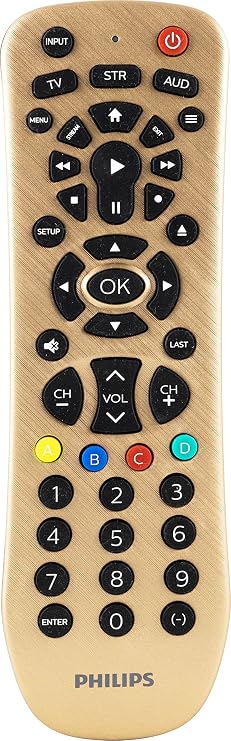
Philips Universal Remote Control Replacement for Samsung, Vizio, LG, Sony, Sharp, Roku, Apple TV, RCA, Panasonic, Smart TVs, Streaming Players, Blu-ray, DVD, Simple Setup, 3 Device, Gold, SRP3219G27
Enhance your viewing experience with the trusted Philips brand. Elevate your home entertainment setup with our reliable and easy-to-use 3-Device Universal Remote Control.
Philips Universal Remote Control Replacement for Samsung, Vizio, LG, Sony, Sharp, Roku, Apple TV, RCA, Panasonic, Smart TVs, Streaming Players, Blu-ray, DVD, Simple Setup, 3 Device, Gold, SRP3219G27
Item #: 31339110

Philips Universal Remote Control Replacement for Samsung, Vizio, LG, Sony, Sharp, Roku, Apple TV, RCA, Panasonic, Smart TVs, Streaming Players,

Item #: 31339110

€ 22

Price Details

Excluding Shipping & Custom charges ( Shipping and custom charges will be calculated on checkout )

*All items will import from US

0 ratings Write a review
Out of stock
us Imported from USA store
Our Top Logistics Partners
  • fedex
  • dhl
Enhance your viewing experience with the trusted Philips brand. Elevate your home entertainment setup with our reliable and easy-to-use 3-Device Universal Remote Control.
U-Care Warranty:
None
Select a Plan
fast shipping

Fast
Shipping

free return

Free
Return*

secure packaging

Secure Packaging

100% original products

100% Original Products

pci-dss

PCI DSS Compliance

iso certified

ISO 27001 Certified


paypal payment
visa payment
mastercard payment
Note: Step Down Voltage Transformer required for using electronics products of US store (110-120). Recommended power converters Buy Now.

What Stands Out

Universal Compatibility
This remote works seamlessly with multiple brands like Samsung, LG, Sony, and Apple TV, simplifying controls for various devices in one universal solution.
Multiple Device Control
Control up to three devices simultaneously, reducing clutter and enhancing convenience for users with multiple entertainment setups.
User-Friendly Design
Ergonomically designed with intuitive buttons, making it easy for users to navigate and control their smart TVs without confusion.

Product Details

Shop the Philips Universal Remote Control for Smart TVs, Blu-ray, DVD players & more. Easy setup. Compatible with Samsung, Vizio, LG, Sony, Sharp & other popular brands. Shop at Ubuy Malta
Item Weight0.4 lbs (180 grams)

Who Should Buy?

Suitable For
  • Multiple Device Owners

    Perfect for users who own multiple devices like TVs and streaming players, streamlining control into one remote.

  • Convenience Seekers

    Ideal for those who want simplified access to various devices without juggling multiple remotes.

  • Replacement Needs

    Excellent for users needing a reliable replacement for lost or damaged remotes across various brands.

Not Suitable For
  • Tech-Savvy Users

    May not satisfy advanced users who prefer customizable settings or features that this remote does not support.

  • Legacy Device Users

    Not suitable for users with older devices that may not be compatible with this universal remote model.

  • Simplicity Preferrers

    Less ideal for users who find universal remotes complicated and prefer original remotes for straightforward usability.

Product Description

Philips Universal Remote Control Replacement for Samsung, Vizio, LG, Sony, Sharp, Roku, Apple TV, RCA, Panasonic, Smart TVs, Streaming Players, Blu-ray, DVD, Simple Setup, 3 Device, Gold, SRP3219G27

Have any Query? Chat with us

Customer Questions & Answers

  • Question: What devices are compatible with the Philips Universal Remote Control?

    Answer: The Philips Universal Remote Control is designed to work with a wide variety of devices including TV brands like Samsung, Vizio, LG, Sony, Sharp, and RCA, as well as streaming players such as Roku and Apple TV. This extensive compatibility makes it a versatile option for households with multiple entertainment devices. It simplifies the control of your viewing experience by eliminating the need for different remote controls for each device.
  • Question: How do I program the Philips Universal Remote Control?

    Answer: Programming the Philips Universal Remote Control is straightforward. You can either use the automatic code search method or enter the specific code for your device manually. To perform the automatic search, simply press and hold the 'SETUP' button until the red indicator stays on, then release the 'SETUP' button and press the 'POWER' button. Follow the on-screen prompts until your device turns off. This ensures a seamless connection to your devices, enhancing your overall entertainment experience.
  • Question: Can I use this remote for Smart TVs?

    Answer: Yes, the Philips Universal Remote Control is compatible with most Smart TVs, including brands like Samsung, LG, and Sony. This makes it an ideal replacement option since it allows you to control not only traditional TV functions but also smart features like streaming apps, settings menus, and more. This combination of control simplifies managing your viewing experience, making it user-friendly across various Smart TV models.
  • Question: Is the Philips Universal Remote Control backlit?

    Answer: The Philips Universal Remote Control does not come with a backlit feature. While this means using it in dimly lit environments may require some adjustment, it’s generally designed for ease of use with clearly labeled buttons. This design keeps your remote intuitive; you can find the right buttons quickly, ensuring a smooth user experience in most lighting conditions at home.
  • Question: Does the Philips Universal Remote Control require batteries?

    Answer: Yes, the Philips Universal Remote Control operates on batteries, which are typically included with your purchase. Inserting the batteries is a simple process: just remove the battery cover on the back and insert the batteries as indicated. This easy setup allows you to quickly start using the remote for all your home entertainment systems without the hassle of extensive installations.
  • Question: Is there a limit to the number of devices I can control with this remote?

    Answer: The Philips Universal Remote Control can manage up to eight devices at a time, which is quite sufficient for most home entertainment setups. This allows you to integrate and control different devices without the clutter of multiple remotes, contributing to a more organized and user-friendly living space. This feature is particularly useful for avid TV watchers who enjoy switching between several sources.
  • Question: How can I reset the Philips Universal Remote Control?

    Answer: To reset the Philips Universal Remote Control, locate the 'SETUP' button and hold it until the red indicator stays on, then release the button. Next, press and hold the 'RESET' button for a few seconds until the indicator turns off. This resets the remote and helps resolve any issues or conflicts with device programming, ensuring that you can restore functionality quickly and easily.
  • Question: What should I do if my devices won't respond to the remote?

    Answer: If your devices aren't responding to the Philips Universal Remote Control, first ensure that the remote's batteries are properly inserted and functional. Next, verify that the remote is correctly programmed for the specific devices. You may consider reprogramming as outlined in the manual. This troubleshooting helps you regain control over your home entertainment system without unnecessary delays.
  • Question: Where can I buy Philips Universal Remote Control Replacement in Malta?

    Answer: You can buy the Philips Universal Remote Control Replacement from Ubuy in Malta. Ubuy offers a wide selection of remote controls designed for various brands and models, making it easy to find the one that fits your devices perfectly. Shopping from Ubuy ensures that you can easily locate this universal remote, streamlining your home entertainment setup.
  • Question: Does the Philips Universal Remote Control come with a manual?

    Answer: Yes, the Philips Universal Remote Control typically comes with an easy-to-follow user manual. This manual guides you through initial setup, programming your devices, and troubleshooting common issues. Having a manual provides you with valuable information on maximizing the remote's capabilities, ensuring you get the most out of your universal remote experience.

Philips Remote Controls Editorial Review

This remote has mixed reviews, some customers find it comfortable and easy to program, whereas others find it uncomfortable and difficult to use even after programming the correct codes. The customer service for this product is helpful and responsive to queries. It can work for different brands of TV/DVD combo unit except Sigmac TV, and it is not compatible with Roku Streaming STICK or Fire TV STICK as they use RF or Bluetooth-based remotes. Overall, customers who succeeded in programming it are pleased with the functionality and price.

Customer Reviews & Ratings

5.0
1 customers ratings
  • 5 Star
    100%
  • 4 Star
    0%
  • 3 Star
    0%
  • 2 Star
    0%
  • 1 Star
    0%

Review this product

Share your thoughts with other customers

Pros

  • Easy to program for some customers
  • Multiple compatible codes for different TV/DVD brands
  • Affordable price

Cons

  • Uncomfortable for some users

Product Price History

Important information

  • Limitations : For products shipped internationally, please note that any manufacturer warranty may not be valid; manufacturer service options may not be available; product manuals, instructions, and safety warnings may not be in destination country languages; the products (and accompanying materials) may not be designed in accordance with destination country standards, specifications, and labeling requirements; and the products may not conform to destination country voltage and other electrical standards (requiring use of an adapter or converter if appropriate). The recipient is responsible for assuring that the product can be lawfully imported to the destination country. When ordering from Ubuy or its affiliates, the recipient is the importer of record and must comply with all laws and regulations of the destination country.
  • Not all the products listed on Ubuy are for sale, as Ubuy is a global search engine. Products are subject to export/trade regulations.