0 ratings





Item #:
821452
Triple Monitor USB 3.0 Docking Station, 2x 4K DisplayPort & HDMI, USB Type A Universal Laptop Dock, Windows/Mac, TAA
Item #:
821452
€ 143
Price Details
Excluding Shipping & Custom charges ( Shipping and custom charges will be calculated on checkout )
*All items will import from US
In stock
 Imported from USA store
QTY:
Only 10 items left in stock.
Order now and get it around Tuesday, June 30
Secured transaction
Ubuy works hard to protect your security and privacy. Our advanced payment security system ensures confidentiality by encrypting your information during transmission using AES (Advanced Encryption Standards) and SSL (Secure Socket Layer) protocols. Your payment details are 100% secure as we do not share your payment details with third party sellers.
Our Top Logistics Partners


This dock maximizes your screen real estate so you can simultaneously access multiple applications and compose on one display while referencing material on the other.

Fast
Shipping

Free
Return*

Secure Packaging

100% Original Products

PCI DSS Compliance

ISO 27001 Certified


Note: Step Down Voltage Transformer required for using electronics products of US store (110-120). Recommended power converters Buy Now.


Product Details
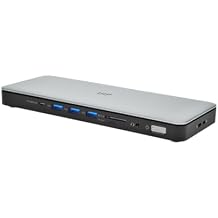
- TRIPLE DISPLAY DOCKING STATION: This universal USB 3.0 laptop dock lets users maximize their display capabilities with a triple monitor (1 x HDMI and 2 x DP) or dual-monitor setup, which will help to boost productivity
- 4K ULTRA HD RESOLUTIONS: Bring a lifelike picture to your monitor or display with this 4K USB docking station that supports resolutions up to 3840x2160 on one of the displays while supporting and 2048x1152 on the other two
- CONNECT & CHARGE YOUR USB PERIPHERALS: Connect up to five USB devices with this USB 3.0 DisplayPort & HDMI docking station. For added convenience, you can quickly charge your USB devices using the integrated USB fast-charge port
- CREATE A POWERFUL WORKSTATION: In addition to the five USB ports, the triple display docking station features a GbE RJ45 port and headset jack plus a separate 3.5mm audio and microphone port
- OS COMPATIBILITY: This USB docking station works with Windows, Mac, and ChromeOS; Includes 1x 3.3ft (1m) USB 3.0 Type-A to B host cable; NOTE: USB-C hosts will need a USB 3.0 Type-C to B cable or USB 3.0 Type-C male to Type-A female adapter (not incl.)
| Hardware Interface | USB Docking Station |
| Compatible Devices | Apple MacBook Air M1/M2/M3/M4, Apple MacBook Pro 13 M1/M2/M3, Apple MacBook Pro 14 M1 Pro/M2 Pro/M3 Pro, Apple MacBook Pro 16 M1 Pro/M2 Pro/M1 Max/M2 Max/M3 Pro, Apple MacBook Pro 15 2019/2018/2017/2016, Apple MacBook Pro 13 2020 Intel/M1, Apple MacBook Pro 13 2021 M1 Pro/M1 Max, Apple MacBook Air 2022 M2, Apple MacBook Pro 14 2021 M1 Pro/M1 Max, Apple MacBook Pro 16 2021 M1 Pro/M1 Max, HP Spectre x360 13-aw0000/13-df0000/13-af0000/13-ap0000/13-ba0000/14-ea0000/14-df0000/14-cd0000/14-bc0000/14-bd0000/15-df0000/15-eb0000/15-bl0000/15-ds0000/15-ch0000, HP Elite Dragonfly G2 2B5G1AV/2B5G2AV/2B5G3AV, HP Elite Dragonfly G3 3B5G1AV/3B5G2AV, HP EliteBook 830 G7 Intel/AMD, HP EliteBook 830 G8 Intel/AMD, HP EliteBook 840 G7 Intel/AMD, HP EliteBook 840 G8 Intel/AMD, HP EliteBook 850 G7 Intel/AMD, HP EliteBook 850 G8 Intel/AMD, HP Envy 13-ba0000/13-df0000/13-ap0000/14-eb0000/14-df0000/15-df0000/15-cd0000/15-bc0000, HP Envy x360 13-bd0000/13-dq0000/13-cb0000/14-bd0000/14-ce000 |
| Total Usb Ports | 5 |
| Number of Ports | 5 |
| Total Number of HDMI Ports | 1 |
| Wattage | 32.5 |
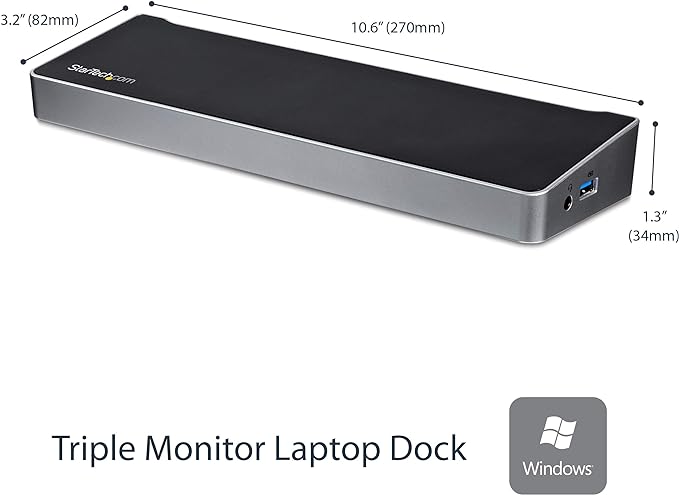
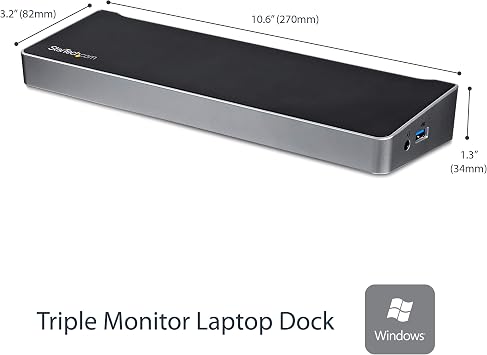
| Item Dimensions L x W x H | 10.6"L x 3.2"W x 1.3"H (26.9 x 8.1 x 3.3 cm) |
| Item Weight | 13.28 ounces (376.49 grams) |
| Color | Black, Silver, Grey |
| Brand | StarTech.com |
| Global Trade Identification Number | 00065030860918 |
| UPC | 065030860918 |
| Manufacturer | StarTech.com |
| Model Number | USB3DOCKH2DP |
| Mfr Part Number | USB3DOCKH2DP |
| Item Type Name | Docking Station |
| Built-In Media | 3.3ft USB 3.0 Host Cable,Universal Power Adapter (NA/EU/UK/AU) |
| Compatible Devices | Apple MacBook Air M1/M2/M3/M4, Apple MacBook Pro 13 M1/M2/M3, Apple MacBook Pro 14 M1 Pro/M2 Pro/M3 Pro, Apple MacBook Pro 16 M1 Pro/M2 Pro/M1 Max/M2 Max/M3 Pro, Apple MacBook Pro 15 2019/2018/2017/2016, Apple MacBook Pro 13 2020 Intel/M1, Apple MacBook Pro 13 2021 M1 Pro/M1 Max, Apple MacBook Air 2022 M2, Apple MacBook Pro 14 2021 M1 Pro/M1 Max, Apple MacBook Pro 16 2021 M1 Pro/M1 Max, HP Spectre x360 13-aw0000/13-df0000/13-af0000/13-ap0000/13-ba0000/14-ea0000/14-df0000/14-cd0000/14-bc0000/14-bd0000/15-df0000/15-eb0000/15-bl0000/15-ds0000/15-ch0000, HP Elite Dragonfly G2 2B5G1AV/2B5G2AV/2B5G3AV, HP Elite Dragonfly G3 3B5G1AV/3B5G2AV, HP EliteBook 830 G7 Intel/AMD, HP EliteBook 830 G8 Intel/AMD, HP EliteBook 840 G7 Intel/AMD, HP EliteBook 840 G8 Intel/AMD, HP EliteBook 850 G7 Intel/AMD, HP EliteBook 850 G8 Intel/AMD, HP Envy 13-ba0000/13-df0000/13-ap0000/14-eb0000/14-df0000/15-df0000/15-cd0000/15-bc0000, HP Envy x360 13-bd0000/13-dq0000/13-cb0000/14-bd0000/14-ce000 See more |
| Total USB Ports | 5 |
| Product Dimensions (L x W x H) | 10.6"L x 3.2"W x 1.3"H (26.9 x 8.1 x 3.3 cm) |
| Total HDMI Ports | 1 |
What's in the box
3.3ft USB 3.0 Host Cable,Universal Power Adapter (NA/EU/UK/AU)
Product Description
Have any Query? Chat with us
Related Searches
Customer Questions & Answers
-
Question:
What is the maximum resolution supported by the StarTech.com Triple Monitor Docking Station?
Answer: The StarTech.com Triple Monitor Docking Station supports a maximum resolution of 4096x2160 (4K) at 60Hz for both DisplayPort outputs and 3840x2160 (4K) at 30Hz for the HDMI output. This ensures crisp and clear visuals whether you're working on design projects or enjoying high-definition media. Multiple 4K displays enhance your productivity by allowing more screen real estate, making multitasking seamless and efficient. -
Question:
What types of USB connections are available on this docking station?
Answer: This docking station features USB 3.0 Type-A ports, offering high-speed data transfer rates up to 5Gbps. With multiple USB ports, you can easily connect various peripherals such as keyboards, mice, and external drives. This versatility helps you to create a well-connected workspace that meets all your needs, whether for office tasks or entertainment purposes. -
Question:
Is the StarTech.com Triple Monitor Docking Station compatible with both Windows and Mac?
Answer: Yes, the StarTech.com Triple Monitor Docking Station is fully compatible with both Windows and Mac operating systems. This cross-platform support makes it an ideal choice for users who operate multiple devices. You can switch between different laptops without any hassle, making this docking station suitable for professional environments or home offices where multiple users may share the same setup. -
Question:
Can I connect multiple monitors to this docking station, and how does it work?
Answer: Absolutely! This docking station allows you to connect up to three monitors, two via DisplayPort and one via HDMI. It uses DisplayLink technology to manage multiple displays, enabling you to expand your visual workspace significantly. This setup is perfect for professionals in design, data analysis, or programming who need to have multiple applications open and visible at the same time for enhanced productivity. -
Question:
What types of devices can I connect to the StarTech.com docking station?
Answer: You can connect a variety of devices to the StarTech.com Triple Monitor Docking Station, including laptops, notebooks, and tablets that support USB connections. Additionally, it can also interface with peripherals such as external hard drives, printers, and scanners. This wide range of compatibility ensures that it accommodates a diverse set of work environments and user needs. -
Question:
Does the docking station offer power delivery capabilities?
Answer: The StarTech.com Triple Monitor Docking Station does not support power delivery (PD) to charge laptops. Instead, it focuses on providing multiple display outputs and USB connectivity. This means if you're using it with a laptop, you will need to connect your laptop's charger separately. However, the robust connectivity it offers makes it an invaluable addition, facilitating a more organized workspace without compromising on functionality. -
Question:
How do I set up the StarTech.com Triple Monitor Docking Station?
Answer: Setting up the StarTech.com docking station is straightforward. Plug it into your laptop via USB 3.0, connect your monitors to the appropriate outputs (DisplayPort or HDMI), and install the necessary drivers from the StarTech website. The process usually takes just a few minutes. This simple installation lets you quickly enhance your workspace and begin enjoying the benefits of extended screen real estate. -
Question:
What types of cables do I need to connect my monitors?
Answer: To connect your monitors to the StarTech.com Triple Monitor Docking Station, you will need DisplayPort and HDMI cables compatible with your existing displays. If your monitors support 4K resolution, ensure your cables are also rated for 4K to experience the best picture quality. Having the right connection ensures smooth display performance and takes full advantage of the docking station's capabilities. -
Question:
Is the docking station suitable for gaming?
Answer: While the StarTech.com Triple Monitor Docking Station is designed primarily for productivity, it can certainly facilitate gaming on multiple monitors if your laptop supports the required graphics performance. Keep in mind that gaming may demand high-bandwidth connections, so ensure your laptop’s graphics card is capable of handling multi-display configurations, particularly at higher resolutions. -
Question:
Where can I buy the StarTech.com Triple Monitor USB 3.0 Docking Station in Malta?
Answer: You can purchase the StarTech.com Triple Monitor USB 3.0 Docking Station from Ubuy in Malta. Ubuy offers a wide range of electronic products, ensuring you have access to the latest technology and supporting your shopping needs with ease.
StarTech.com Docking Stations USB3DOCKH2DP Editorial Review


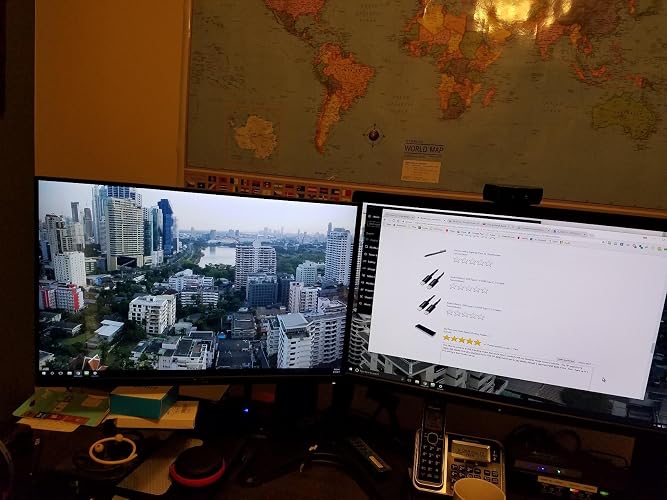
The StarTech.com Triple Monitor USB 3.0 Docking Station has garnered appreciation for its ability to effortlessly expand connectivity options for modern laptops, making it a valuable addition for users who require multiple monitor setups. Users have lauded the dock for its capability to support up to three external monitors through DisplayPort and HDMI, making it especially useful for professionals working in design, data analysis, or any field requiring extensive multitasking. The setup process is reported to be straightforward, taking just a minute to connect and configure. While there are some concerns regarding compatibility with certain operating systems, particularly for Linux users, the overall functionality and flexibility of the docking station appear to outweigh these drawbacks for most users. Many note the solid Construction and reliable performance of the device, as well as a generous array of USB 3.0 ports compared to other docks that often include a mix of USB 2.0. The positive feedback extends to customer service experiences, with users reporting efficient handling of product issues, which adds to their overall satisfaction. The dock's design also earns praise for its ability to enhance airflow for laptops that generate heat, showcasing attention to practical user needs. However, a few users have expressed frustrations with software limitations, particularly regarding macOS support, where features like Night Shift are absent. Additionally, there are indications that the dock's performance can suffer under certain conditions related to laptop configurations, specifically when dealing with GPUs. In summary, while StarTech's Triple Monitor Docking Station meets a wide range of connectivity needs and has a strong user reception for its functionality and customer support, potential buyers should Consider its software Constraints, particularly if they are using macOS. **
Customer Reviews & Ratings
502 customers ratings
-
5 Star
74%
-
4 Star
9%
-
3 Star
7%
-
2 Star
4%
-
1 Star
6%
Review this product
Share your thoughts with other customers
Pros
- Supports up to three monitors via DisplayPort and HDMI.
- Easy setup process; users report initial configuration taking only about a minute.
- Generous USB 3.0 port availability.
- Solid Construction and build quality.
- Excellent customer support experience noted by users.
Cons
- Limited macOS support, lacking features like Night Shift.
Top selling Triple Monitor Docking Station in South Africa




Last Updated on June 10, 2026
Product Price History
Important information
- Limitations : For products shipped internationally, please note that any manufacturer warranty may not be valid; manufacturer service options may not be available; product manuals, instructions, and safety warnings may not be in destination country languages; the products (and accompanying materials) may not be designed in accordance with destination country standards, specifications, and labeling requirements; and the products may not conform to destination country voltage and other electrical standards (requiring use of an adapter or converter if appropriate). The recipient is responsible for assuring that the product can be lawfully imported to the destination country. When ordering from Ubuy or its affiliates, the recipient is the importer of record and must comply with all laws and regulations of the destination country.
- Not all the products listed on Ubuy are for sale, as Ubuy is a global search engine. Products are subject to export/trade regulations.
€ 143
Order now and get it around Tuesday, June 30
This item is not restrict in my country.(Please click on above link if this item is not restrict in your country, So our team will review and allow.)
QTY:
Only 10 items left in stock.
Secured transaction
Ubuy works hard to protect your security and privacy. Our advanced payment security system ensures confidentiality by encrypting your information during transmission using AES (Advanced Encryption Standards) and SSL (Secure Socket Layer) protocols. Your payment details are 100% secure as we do not share your payment details with third party sellers.
Our Top Logistics Partners
Fastest cross-border delivery
Features & Benefits
- Transform your USB 3.0 laptop into a full workstation with triple monitor support.
- Achieve stunning resolutions up to 4K Ultra HD on one screen and 2048x1152 on the others.
- Utilize four displays in total for enhanced multitasking and efficient workflow.
- Five USB 3.0 ports, including a fast-charge port, to support all your peripherals.
- Includes GbE port, headset jack, and separate audio/mic ports for versatile connectivity.
- Backed by a 3-year warranty and free lifetime technical support for peace of mind.